
TourRadar connects travelers and travel agents with over 2,500 multi-day operators. This guide helps you identify when you’re speaking to a Travel Agent and how to handle their booking or quote requests.
How to Identify a Travel Agent on the Booking Conversation Page
-
Go to the Booking Conversation Page (BCP)
-
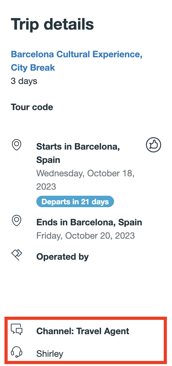
Look at the Trip Details section on the left-hand side
-
If the request is from a Travel Agent, you’ll see:
-
A microphone icon along with the Travel Agent’s name
-
The channel label confirming the agent status
-
How to Respond to Travel Agent Requests
Treat these requests just like any regular quote or booking, with a few key differences:
-
Always include the gross price in your quote. This means the full retail price including TourRadar’s commission.
-
Do not discuss commission with the Travel Agent. TourRadar handles all commission payouts directly.
-
Use the BCP to respond clearly and promptly to all requests.
NOTE: If you need assistance with these BCPs, please reach out on the TourRadar tab if needed.