
Key Features
-
Applies to all adventures
-
Same discount and date settings across all adventures
-
Departure exclusions are not available for this setup. If you’d like to exclude specific departure dates, please refer to “How to Add a Promotion Based on One Adventure.”
Step‑by‑Step Instructions
-
Log in to your Operator Dashboard.
-
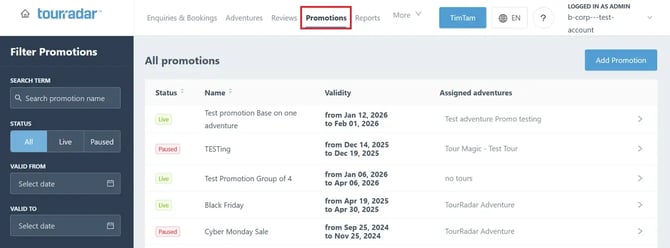
Click Promotions from the top menu.
-
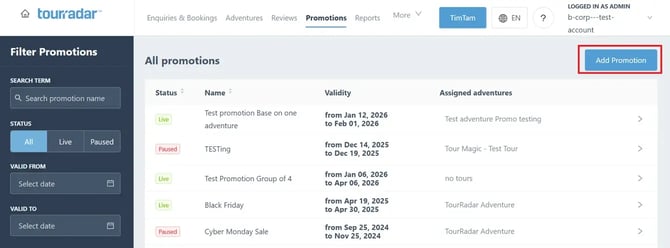
Select Add Promotion.
-
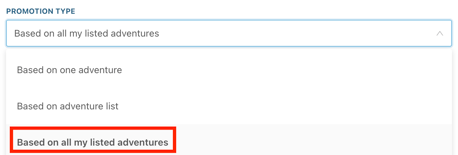
Choose Promotion Type: Based on All My Listed Adventures.
-
Enter a Promotion Name.
-
Set the Promotion Status to Live.
-
Choose whether the promotion is TourRadar Exclusive.
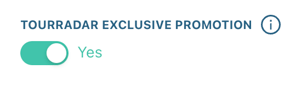
- This promotion is restricted to TourRadar.com. It will not appear on external booking tools or partner platforms.
-
Add the Valid Booking Date Range.
- Add the Departure Date Range.
-
Set the Paid in full by date.
- Only set a date if this promotion requires a different final payment date than your standard full-payment configuration
-
Add a Description and Terms.
-
Select the Promotion Type.
-
Select the Value Type.
-
Add the Discount per Currency.
-
Click Save Promotion.
Your promotion is now live.
Note: You are unable to edit an existing promotion
If you need to edit an existing promotion please pause the promotion and load a new promotion from scratch following the steps above.
If you only want the promotion to be applied to a particular currency or region, simply email the Business Development Team.